





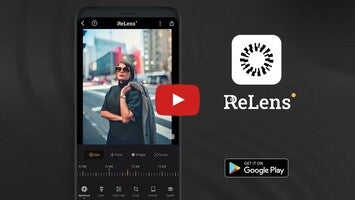












Elevate your mobile photography to professional standards with ReLens, a cutting-edge application designed to transform your phone into an HD and DSLR-quality camera. Immerse yourself in the art of photography with the accessibility of your mobile device. It integrates advanced AI computational photography and algorithms, enabling the creation of stunning portraits with a pronounced bokeh effect, akin to DSLR images.
Showcase your creativity with a variety of lenses and reproduce the effects of classic SLR lenses like the admired 50mm f/1.4 and M35mm f/1.4, along with specialized filters for both portrait and landscape photography. The software's AI capabilities enhance photos by recalculating depth of field to add realistic and compelling bokeh effects.
These features include manual control over exposure, shutter, ISO focus, and white balance, offering the flexibility found in professional photography equipment. It also simulates shutter blade shapes and provides over twenty distinct bokeh shapes such as pentagrams and hearts. Users can emulate unique spots, textures, and light effects to achieve photos that resonate with character.
An all-purpose professional camera, the tool also comes equipped with manual mode, burst mode, and even professional camcorder capabilities, with 4K video recording on supported models. It displays professional information such as volume indicator, battery capacity, and storage space.
The built-in photo editor empowers users to fine-tune images with intelligent zone adjustment and offers an extensive array of color grading tools and filters. Night enhancement and noise reduction features ensure images maintain clarity in various lighting conditions. Privacy-conscious individuals will appreciate that image processing occurs on the device, ensuring no personal data is uploaded to servers.
Users can expect routine updates with new features for an ever-improving photography experience. Discover the full potential of the app and redefine mobile photography, capturing life's moments with exceptional detail and artistic flair.
Requirements (Latest version)
- Android 5.0 or higher required


 11 reviews
















Comments
It's beautiful
wow
🤩
Better than perfect 😍😍😍
For me as a photographer, it is a very complete and professional application, and it improves with each update with new features and polishing those already there. I highly recommend it for people who...See more